Tech
Google AI Studio Revamp (2026 edition)


TL;DR
I've been watching Google try to win the developer tools race for a while now. You will be surprised to find out how many products Google has...but this is the one they should focus now.
I've been watching Google try to win the developer tools race for a while now. Every few months there's another announcement. You will be surprised to find out how many products Google launched but are quietly under the radar. And each time, the same question comes up: is this actually useful, or is Google just moving things around on the shelf?
With the latest revamp of Google AI Studio, the answer is more interesting than usual. Something real has changed. But so has the gap between what Google is marketing and what developers are actually experiencing.
Here's what's really going on.
What Google AI Studio has become
AI Studio started life as MakerSuite, a browser-based sandbox for testing prompts. That's it. You'd paste in text, fiddle with parameters, and see what Gemini spat out.
That's not what it is anymore.
Today, AI Studio is pitched as a browser‑based full‑stack application generator. You write out what you want in plain English, and the system proposes an architecture, writes the code, wires in services, and offers to deploy it for you. The term floating around for this workflow is "vibe coding", where you describe the intent and constraints, and let the model choose the concrete implementation details. Nowadays, multi-agentic workflows like Simular.ai or Open Claw can build a full-stack application with just one prompt from the human.
For non-technical founders and product managers, this is genuinely useful. You can go from a napkin sketch to a working prototype with a real database and authentication in an afternoon. But for our dear experienced engineers, it's more complicated...
The Firebase integration is the big deal
The most significant change is the infrastructure.
When you build something in AI Studio that needs a backend, the AI automatically detects this and offers to spin up Firebase for you. Accept, and it:
Provisions a Cloud Firestore database.
Sets up authentication, typically using Google sign‑in out of the box.
Writes initial security rules.
Connects the app to these services inside the same project.
All of this happens from within the same browser interface. You describe the feature and the agent does all the heavy-lifting!
Deployment is a single click to Cloud Run.
Google also announced it's shutting down Firebase Studio as a standalone product by March 2027, folding those capabilities directly into AI Studio.
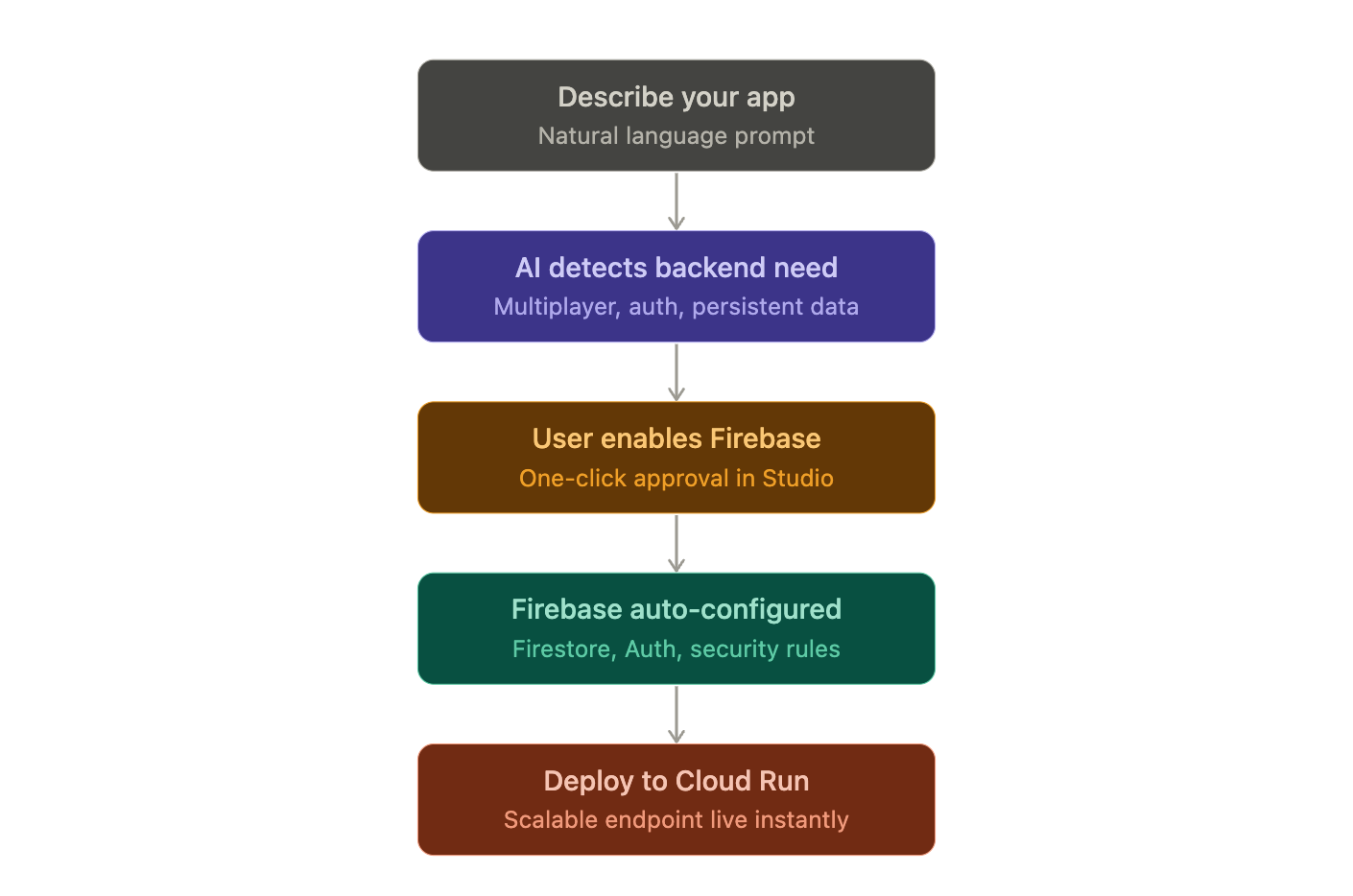
The message is clear: they want one place for the entire path from idea to production.
The new interface additions
Two additions worth knowing about:
Stitch UI is an infinite design canvas built into AI Studio. You can drag in images, text or code as context. There's also a companion file format (DESIGN.md) that the agent reads to maintain consistent branding across everything it generates. Pull a design system from any URL and Stitch imports the rules so the AI stops reinventing your visual style every session.
System Instructions let you set persistent rules at the project level. Tell the agent to always prioritize performance, always use TypeScript, never touch the auth layer, and every subsequent generation follows those constraints. Combined with the ability to leave feedback by drawing directly on the UI or dictating changes by voice, iteration has gotten genuinely faster.
The context window problem nobody wants to talk about
Here's where it gets messy.
Google has been heavily marketing Gemini 3's million-plus token context window. On paper, that means you can stuff huge codebases or entire wikipedias into a single session and expect the model to reason across all of it.
In reality, developer reports tell a more constrained story.
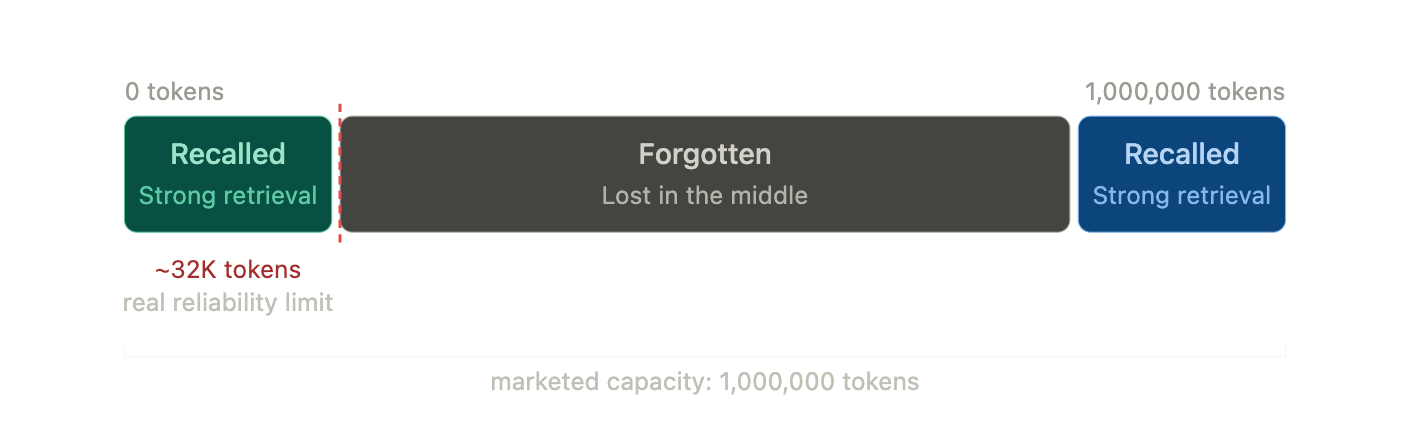
Like other long‑context models, Gemini 3 shows “context window myopia” behavior (a known flaw where the system retrieves information from the very start or end of a long context but misses or distorts what's buried in between). On non‑trivial codebases and long‑form writing, people see the system:
Forgetting earlier architectural decisions.
Dropping character or variable names.
Ignoring constraints that were clearly set earlier in the same session.
The pattern many teams describe is that things start to wobble after tens of thousands of tokens, long before any theoretical million‑token limit.
There are theories about why this happens (including the possibility that browser‑optimized deployments are more aggressively quantized or compressed than server‑side ones), but those are theories that you and I can't prove.
You will notice this when you’ve built out 20 files and ask the agent to tweak a button color but it decides to refactor your Oauth service instead.
Working Around the Model
Developers who get good results out of AI Studio tend to add manual scaffolding around its long‑context behavior.
Common tactics include:
Forcing modularity: instead of asking the model to generate or refactor giant, multi‑purpose files, you keep it focused on small, single‑responsibility modules. The more local the change, the less it depends on fragile global context.
Periodic state summaries: every so often, you ask the model to write an explicit summary of the current architecture and key decisions into a separate document. When things drift, you re‑inject that summary and ground future generations on it.
These workflows are just temporary workarounds. Until the industry can solve this issue, there is really nothing we can do about it.
Hallucinations and the "don't" problem
Two more things that keep coming up in real usage:
The model frequently ignores negative instructions. Tell it not to modify a specific file and it modifies that file. Tell it not to add a dependency and it adds the dependency. Sounds like your rebellious teenager kid huh?
It also hallucinates fixes. When something breaks, the model sometimes invents solutions that don't correspond to anything real. If you know nothing about coding and your app breaks down, good luck spiralling into madness.
In real life, people are genuinely uploading legal contracts and medical documentation for interpretation. To its credit, the model has accurately flagged serious issues in documented cases. However, it has also fabricated regulatory citations and non-existent medical references. Both things are true at the same time, which is an uncomfortable place to leave it.
So who is AI Studio actually for?
Let's take a step back and compartmentalise.
People who benefit the most:
Founders and product people who need to validate a concept fast.
Non‑technical founders and product managers who need to validate a concept and show something working to investors or clients.
Domain experts and researchers who want to build narrow, specialised tools on top of their own data.
Developers who want a fast way to explore logic, UI flows, and integrations before committing to a production implementation.
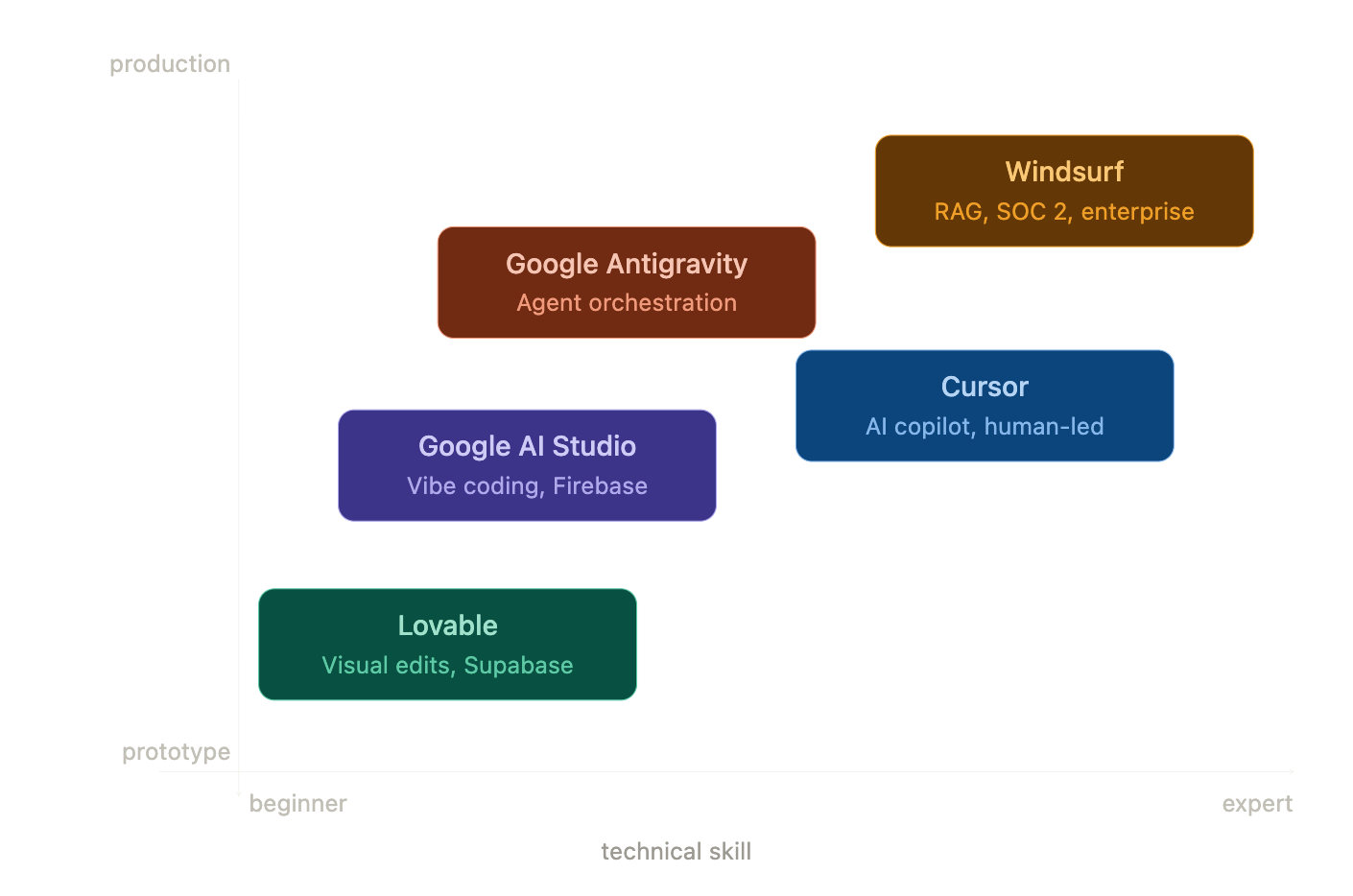
For these people, AI Studio is genuinely impressive. The path from prompt to deployed prototype has never been shorter.
For production engineers working on anything that needs to scale, unfortunately, it starts breaking down.
Where does Google Antigravity fit in?
Google launched Antigravity in November 2025 as a separate product and it's worth understanding how these two Google AI tools relate.
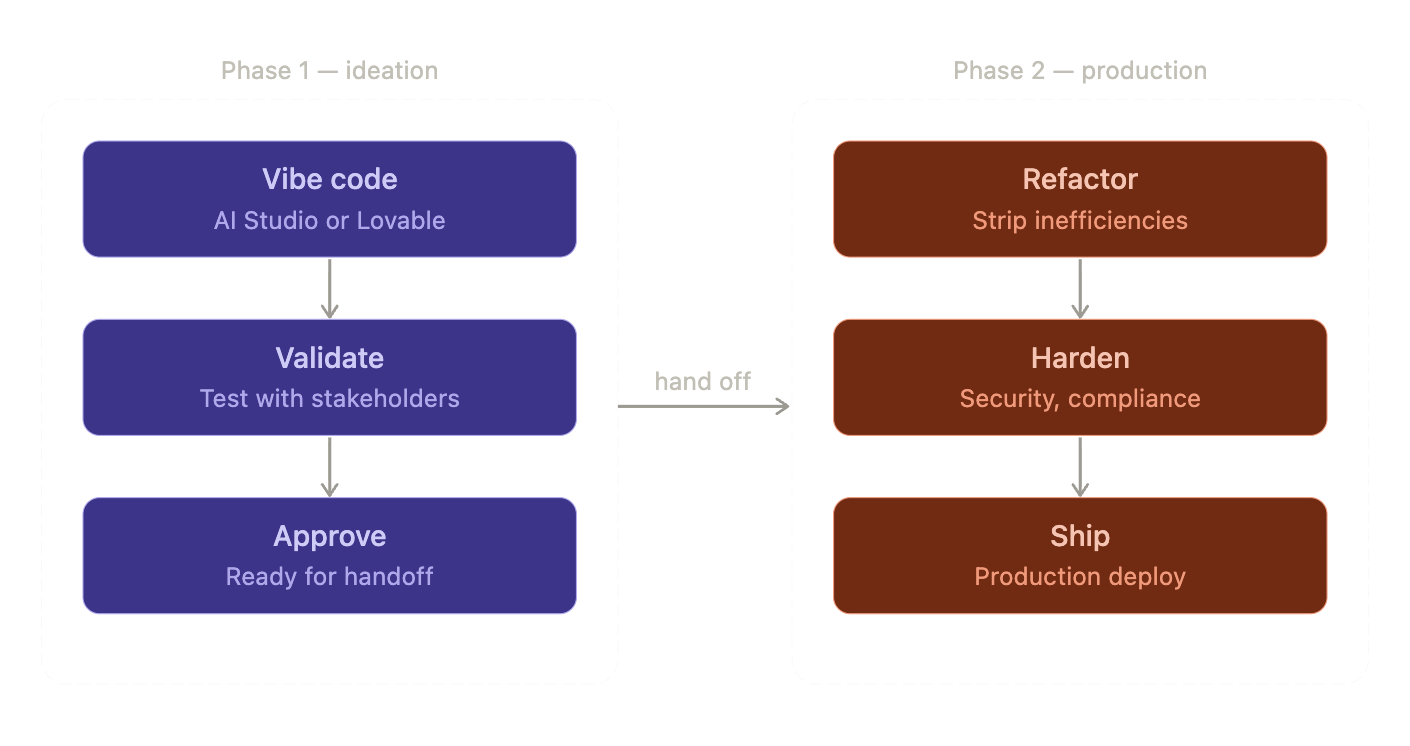
Google AI Studio is a browser‑based prototyping environment optimized for speed and accessibility. Antigravity is a local agentic IDE for professional engineers like Cursor or Claude Code. It is important we distinguish them for different market audience.
The emerging best practice is to use AI Studio to validate the concept, get a working prototype, test the logic with stakeholders.
Once approved, you export the codebase into Antigravity (or Cursor or Claude Code) where professional engineers orchestrate agents to strip out prototype inefficiencies and rebuild for production.
What Google is up against
Google AI Studio isn’t alone in targeting non‑technical builders.
Lovable is chasing the same “describe it and we’ll build it” audience with a slight twist:
It uses Supabase (PostgreSQL‑based and open‑source) instead of Firebase, which makes it less tightly coupled to any single cloud vendor. But Supabase does not offer cloud hosting like Firebase.
It outputs relatively clean React + TypeScript, committing directly to your GitHub repo.
When you outgrow the AI’s capabilities, a human engineering team can pick up a familiar stack without a major migration.
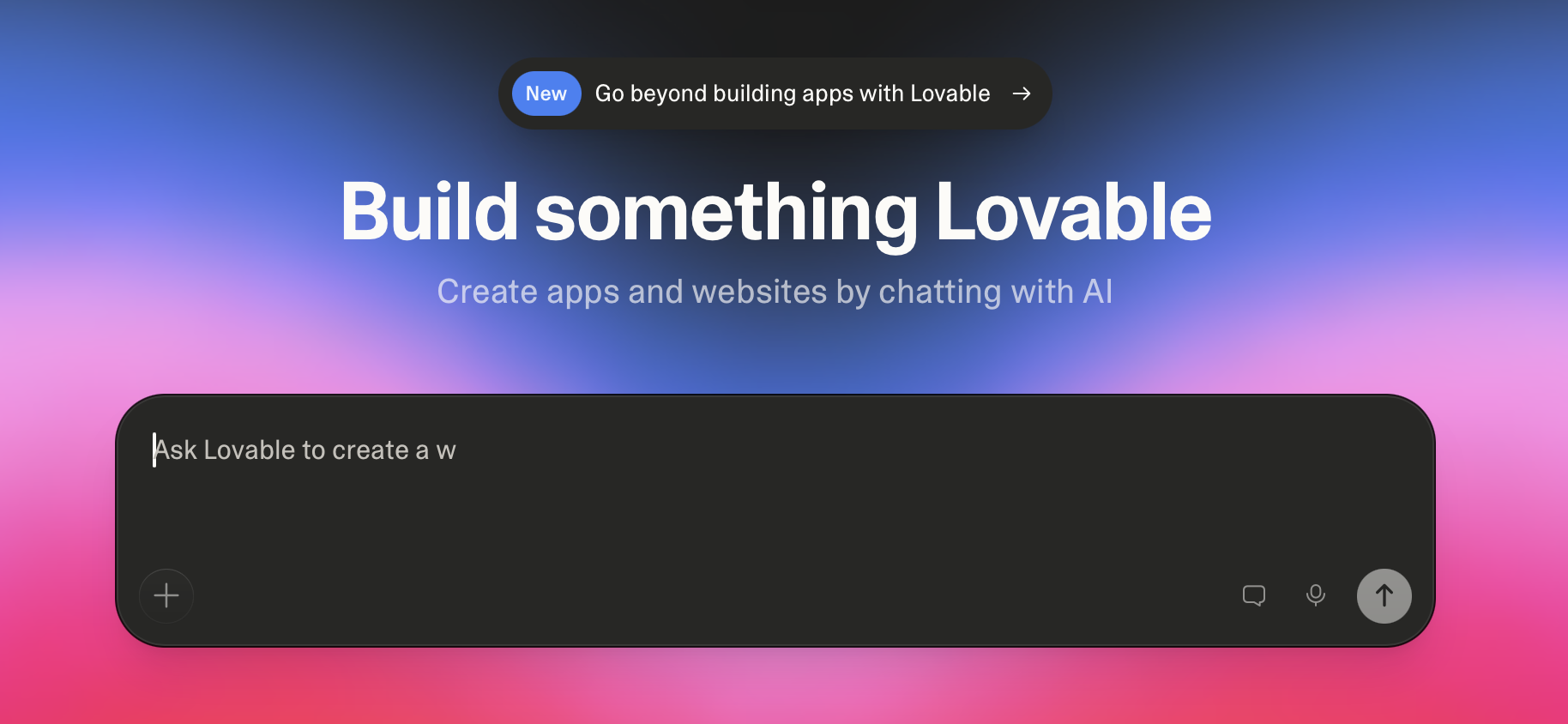
Google AI Studio’s integration with Firebase is faster to get running if you’re fine with Google Cloud. Lovable’s Supabase route is more portable if you expect to move, or if your team strongly prefers Postgres over Firestore.
On the professional IDE side, tools like Cursor and Windsurf are fighting for the “agentic coding environment” slot with their own trade‑offs. Antigravity (still in public preview) has documented security vulnerabilities that require careful configuration before it's safe to use in sensitive environments.
Google's advantage is at the end of the day, its ecosystem.
The honest summary
Two statements about Google AI Studio are true at the same time:
AI Studio is no longer just a prompt sandbox. It’s a full‑stack generator with integrated infrastructure that lets non‑technical people build and deploy real applications in hours.
The underlying model behavior at scale doesn’t match the clean story in the marketing. The context window under-delivers in practice and hallucinations are frequent enough that generated code should never go into production without careful review.
Both can be mutually inclusive.
If you treat AI Studio as a fast way to ship a prototype inside the Google ecosystem, it’s one of the most powerful accessible tools you can use right now.
If you pretend it’s a fully autonomous production engineer, you should reconsider what you really want to build.
The builders getting the most out of it are the ones who understand that distinction before they ever open a new project.